


It’s week two with a new client, and the CEO wants something visible on the website before the next board meeting. You ask who can change the homepage. Nobody is quite sure, because the hosting login lived in an email from someone who left, and the domain turns out to be registered to the freelancer who built the site. A standard website audit checklist would have sent you to page speed and broken links first. Those matter, but they aren’t what stops you.
We’ve been building websites since 2008, and we’ve built and audited 300+ of them. When a company brings in a fractional CMO, we see the same thing again and again: nobody quite knows what the moving parts of the site are, or who holds them. So this checklist runs in a different order: the machinery around the site first, then the site itself. At the end there’s a full table you can copy into your own document.
The 90-day promise problem
The website is the most visible thing a new CMO can change, and that makes it the easiest place to promise a quick result. In my experience it’s also where those promises stall. Usually nobody can get in, or one small change takes weeks to go live. Sometimes the change ships and nobody can prove afterwards that anything moved.
Each of those stalls is quick to find in week one and costly to find in week eight. Access problems surface the moment you ask for a change, and turnaround problems the first time a two-line edit waits a fortnight. Measurement is the sneaky one, because it stays hidden until the CEO asks what your website work actually achieved and the numbers can’t answer.
So audit the machinery first. It takes a few days of asking questions and chasing logins, and it tells you which promises you can keep.
Check who holds the keys first
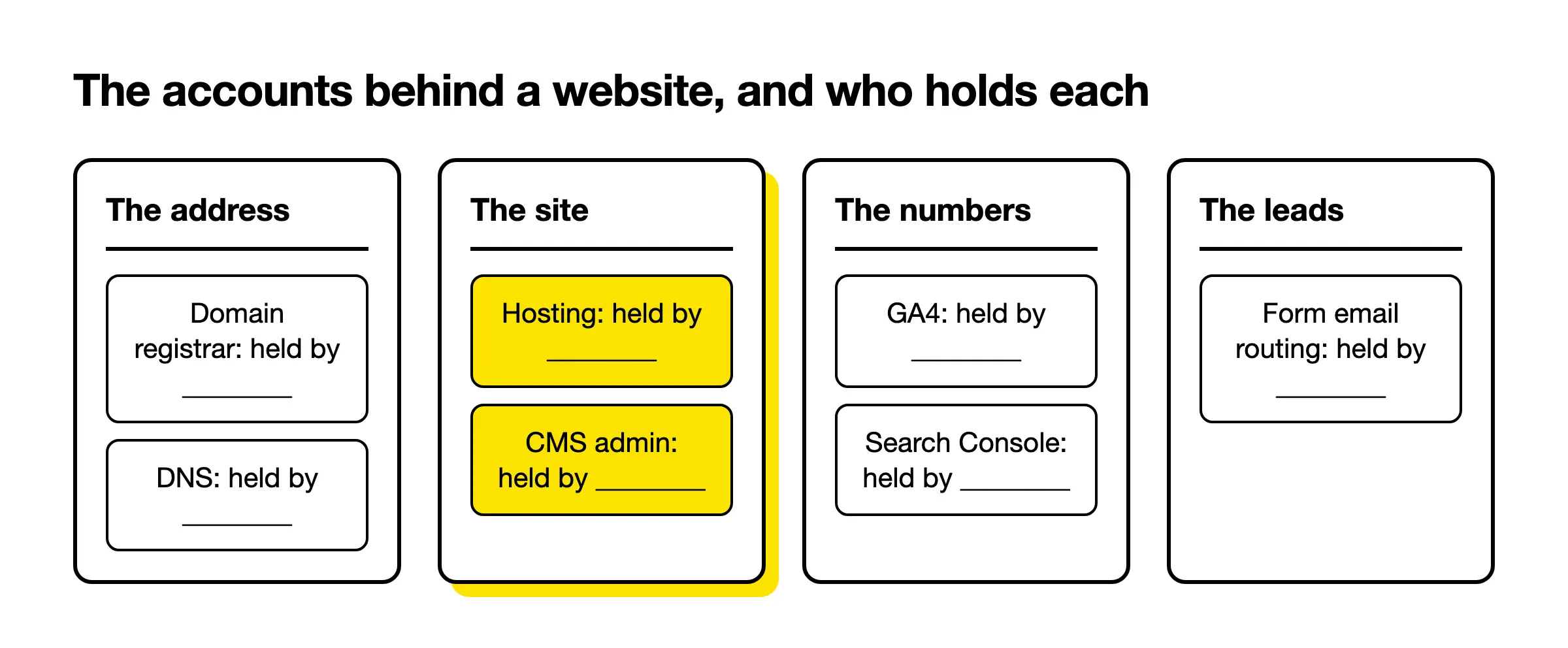
Before you audit a single page, list every account the website depends on and write down who holds each one today. That means the domain registrar, the DNS, hosting, the CMS admin, the theme’s source code, plugin licences, Google Analytics, Search Console and wherever the forms send their emails. Then write down who should hold it.

People usually know the domain exists, because they need it. They often don’t know where it’s registered. Hosting is worse. Sometimes a team has no hosting access at all, because the credentials arrived years ago in an email that’s now lost. Nobody remembers which plugin licences were bought, or which integrations quietly feed the CRM. Tracking all of it down can eat days.
Which gaps are serious
Most of these gaps are annoying and easy to close. A missing plugin licence can simply be bought again, and that’s the end of it. Two gaps are serious. The first is a domain registered to someone outside the company, often the person who used to maintain the site; it shouldn’t happen, but we’ve seen it more than once. The second is a custom theme whose developer won’t hand over the source code. An off-the-shelf theme is fine, since someone else supplies it. A theme built for the company should come with everything needed to change it, and if the original developer refuses, every edit beyond the content gets harder.
Google’s own tools have a version of the same problem. In Search Console, owners have full control and can add or remove other users, so check that an account belonging to the company itself is a verified owner. If you’re taking over a site from an agency or a freelancer, our guide to what to hold in your own name when someone else built the site goes through the handoff in more detail.
Time one small change
The fastest way to learn how a website really works is to ask for two changes in your first week and time them. Request one small copy edit and one new landing page. Write down when you asked and when each went live, and note everyone who had to sign it off.
A copy edit tells you whether anyone can edit content without a developer. The landing page tells you whether a campaign can launch on your schedule, which matters if your plan leans on landing pages rather than the main website. If the copy edit takes three weeks, you’ve learned more than any crawl will tell you.
When a CMO asks us for something visible within weeks, I tell them we need to look at the site from the admin side first, and probably at the code. On most sites we take over, content editing can start within about three days of getting admin access. Where something is still missing, such as a licence or the theme’s source code, we put the change in another way first and finish it properly once access arrives. That clock starts when we get access, which is one more reason to chase the keys early.
For an established relationship the bar is higher. William Russell, a UK international health insurer, has had us looking after their WordPress site since 2020. Their changes are usually picked up by the next working day, and bigger jobs get an estimate within 48 hours. That’s one client’s arrangement, so treat it as a reference point when you judge the turnaround you inherited.
Take the baseline before the first fix
Before you change anything, record what the site does today. Confirm that GA4 records the actions that matter as key events, submit a test form and follow it all the way to the inbox, confirm Search Console is verified, and save a dated snapshot of the numbers. Without it, nobody can prove your first win.

Start with GA4. Google now calls the actions that matter to a business key events, and any event can be marked as one. Check that the ones you’ll report on actually exist and actually fire, such as a sent form or a booking.
Then test the form the slow way. Fill it in yourself, as a stranger would, and follow the submission until it lands in the right inbox and the CRM. If a form has been sending enquiries to a mailbox nobody reads, fixing that one setting will look like a jump in leads. You want the before number on record when it happens.
Last, check that Search Console is verified for the site, then export the numbers you’ll be judged on and save them with today’s date in the file name. A screenshot in a shared folder counts. Memory doesn’t.
Then audit the site itself
Once the keys, the turnaround and the baseline are clear, run the familiar audit in one compact pass: speed, broken links and indexing, titles and headings, mobile, calls to action and forms, and thin pages. Free Google tools cover most of it. The aim is a short, ranked list of fixes.
Most checklists already cover this part, so I’ll keep it short. The pass I’d run on a small or mid-sized marketing site looks like this:
- Speed, using PageSpeed Insights on the homepage and the top landing pages. Look at the Core Web Vitals rather than one overall score.
- Broken links and 404s, found with any site crawler.
- Indexing, in Search Console’s page indexing report, looking for important pages Google has left out.
- Titles, meta descriptions and headings, one clear H1 per page, each describing its own page.
- Mobile, by actually using the main pages and forms on a phone.
- Calls to action and forms, page by page, using our notes on design that converts as a prompt.
- Thin, outdated or duplicated pages, marked to rewrite, merge or retire.
- Accessibility basics and the privacy pages, as simple rows to check, with the details left to whoever owns them.
Rank what you find by two questions. Will anyone outside the marketing team notice it, and can it ship this month without a rebuild?


Patch, rebuild, or change the platform
Sometimes the honest finding of a website audit is that the site shouldn’t be patched at all. The signs are a site far behind the current brand, a theme that no longer gets updates or runs on current PHP, a CMS that’s no longer maintained, or a site marketing can’t edit without a developer.
Those are the signals we use ourselves. If the site looks far behind the company’s branding, keeping it going may cost more than replacing it. A brand audit makes that gap obvious. A theme that’s been abandoned is a slow-burning problem. WordPress publishes the server it expects in its own requirements, and a theme that won’t run on a current PHP version holds the whole site back with it. A platform that’s no longer maintained has the same problem, only bigger.
The last signal is common with startups. The site went up as a static build, maybe with a page builder, and it worked fine until marketing grew. Now every change waits on a developer, and in my experience developers rarely have time to update a website every week. In that case I’d recommend a rebuild on a CMS your team can run, like WordPress set up as a CMS.
A rebuild can fit inside a 90-day plan, just not as the first win. When we build one, a fully tested WordPress website ships two weeks from design delivery in rush mode, or three to four weeks on regular timing, and that clock starts when the design is delivered. So plan it properly, with a website redesign project plan, and find something smaller to show in the meantime.
Pick the win the CEO will see
Your first website win should pass three tests at once. Someone senior should notice it without being told, it should ship in days without waiting on a rebuild or missing access, and it should move a number you recorded in your baseline. A change that passes only one or two of those tests can wait.
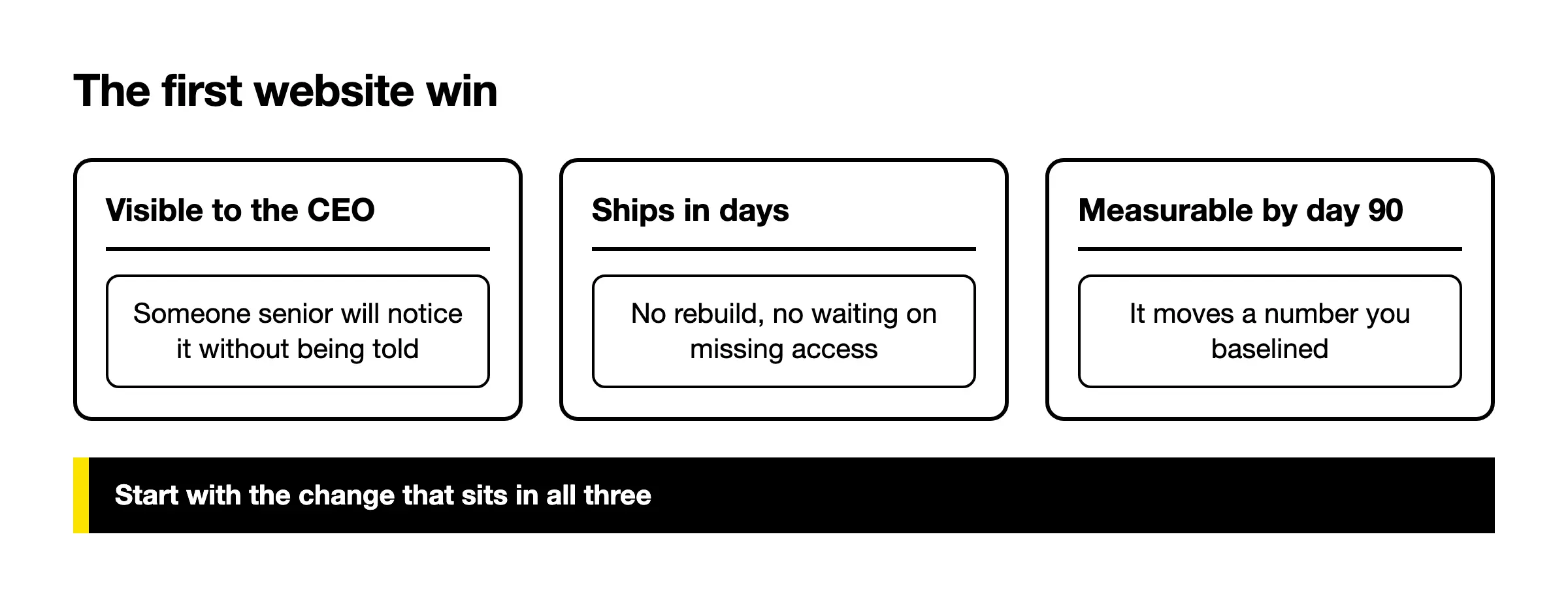
In practice the winner is often unglamorous. A homepage headline and button that finally say what the company sells is a typical one, and so is a campaign landing page that goes live in the same week as the campaign. Neither needs a redesign. Both move a number you can point to.
Then think about who keeps the win running after you’ve moved on to the next priority. That’s usually the client’s own marketing team, so ask whoever builds the site to train them in the CMS. Eleanor Creative, a branding and marketing agency we’ve been the technical delivery partner for, has a team that can run marketing experiments on its site unaided. That’s what you want to leave behind: a team that can change its own website.
The full checklist
Copy this table into a document or spreadsheet. Fill in the owner and the date as each row is done, and leave nothing blank in the first block. The first three blocks come before the site audit, because they decide whether your fixes ship and whether anyone can prove they worked.
| Area | Check | Owner | Date done |
|---|---|---|---|
| Keys | Domain registrar login found, and the domain is registered to the company | ||
| Keys | Domain renewal date noted, auto-renew on, payment card current | ||
| Keys | DNS: who can edit the records | ||
| Keys | Hosting: admin login, plan, and who pays the invoice | ||
| Keys | CMS admin account in the company’s name, not a former employee’s or contractor’s | ||
| Keys | Theme: off the shelf or custom, and for a custom theme, the source code is in the company’s hands | ||
| Keys | Plugins and paid licences: list, renewal dates, and whose account each sits in | ||
| Keys | Integrations (CRM, email, chat, booking): list, with a login for each | ||
| Keys | GA4: the company holds admin access | ||
| Keys | Search Console: a company account is a verified owner | ||
| Keys | Tag manager, if used: who can publish changes | ||
| Keys | Forms: where each one sends its emails, and who receives them | ||
| Keys | Backups: where they’re kept, and when one was last restored | ||
| Turnaround | One copy edit: date requested, date live | ||
| Turnaround | One new landing page: date requested, date live | ||
| Turnaround | Who approves a change, and who can publish it | ||
| Baseline | GA4 key events set up for the actions you’ll report on | ||
| Baseline | Test form submission reaches the inbox and the CRM, and registers as a key event | ||
| Baseline | Search Console verified, sitemap submitted | ||
| Baseline | Dated snapshot saved: leads, key events, organic clicks, top landing pages | ||
| Site | Core Web Vitals checked in PageSpeed Insights for the homepage and top landing pages | ||
| Site | Main pages and forms tested on a phone | ||
| Site | Broken links and 404s found and listed | ||
| Site | Page indexing report checked for important pages left out | ||
| Site | Titles and meta descriptions unique, each describing its page | ||
| Site | One clear H1 per page | ||
| Site | Every key page has one clear next step | ||
| Site | Forms short and working, with a thank-you page | ||
| Site | Thin, outdated or duplicated pages marked to rewrite, merge or retire | ||
| Site | HTTPS everywhere; CMS, theme and plugins up to date | ||
| Site | Accessibility basics checked: image alt text, readable contrast, keyboard use | ||
| Site | Cookie banner and privacy policy: who last reviewed them, and when | ||
| Platform | Theme still maintained and running on a current PHP version | ||
| Platform | CMS or platform still maintained | ||
| Platform | Marketing can edit pages without a developer | ||
| Platform | The site’s look matches the current brand | ||
| Decision | Patch, rebuild, or change the platform | ||
| Decision | First win chosen: visible, ships in days, moves a baselined number |
If a row in the first block stays empty after a week, that’s your first finding, and probably the most useful thing the audit will tell you.
Frequently asked questions
01 How often should you audit a website?
Run the full audit whenever someone new takes over marketing, and before any redesign is signed off. Between those moments, I’d revisit the keys and the baseline rows every quarter, because those are the ones that drift without anyone noticing, as when a contractor leaves with a login or a form starts sending to the wrong inbox. The site checks can follow whatever rhythm your team already reports on. A website that nobody has audited since it launched is the one most likely to hide an expired card on the domain renewal.
02 What’s the difference between a website audit and an SEO audit?
An SEO audit asks whether search engines can find and rank the site, which comes down to indexing, titles, links and speed. A website audit is wider. It includes the SEO checks, but it also asks who controls the accounts, how fast a change ships, whether the analytics can be trusted, whether visitors can act, and whether the platform is worth keeping. For a new CMO the wider version matters more, because most of the early blockers sit outside SEO entirely.
03 Can you do a website audit for free?
Mostly, yes. Google’s own tools cost nothing: Search Console for indexing and search performance, PageSpeed Insights for speed, and the standard version of Google Analytics for key events and traffic. A free crawler covers broken links on a small site. The keys and turnaround parts of this checklist need no tool at all, just a document and a few emails. Where you might pay is in time: chasing a lost hosting login or a domain held by a former freelancer can take longer than every page check combined.
04 How long does a website audit take?
Plan for about two weeks, most of it spent waiting for other people to reply. Start the keys and the baseline in week one, because those answers take longest to come back. The site pass fits in week two, once you know you can act on what it finds. A small marketing site doesn’t need more than that. If week one turns up a domain the company doesn’t own or a custom theme with no source code, the audit isn’t really finished until those are sorted.
05 What should you fix first after a website audit?
Fix whatever blocks the other fixes. A missing login or a domain nobody can trace comes before anything on the page itself. After that, pick the change that passes the tests in the section on the first win. That’s often a clearer homepage message or a campaign landing page. Leave the long tail of technical fixes for a steady monthly rhythm, once the first win is visible.